Docker容器想要使用显卡,尤其是使用CUDA是不能直接实现的,必须对接宿主机本身的驱动。Linux环境下此操作本身就有官方支持,几行命令即可搞定,但Windows下并没有官方支持,本文提供了一套解决方案。
Docker、WSL与显卡驱动的环境准备
Docker环境安装
本文不再赘述,请参考Docker Desktop官网
WSL环境安装
- 安装WSL
wsl --install
- 切换到WSL2
wsl --set-default-version 2
- 安装Ubuntu26.04
wsl --install -d Ubuntu-26.04
- 查看WSL
wsl -l -v
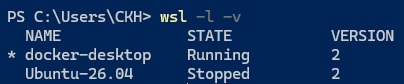 如上图所示即为安装成功
创建用户
运行Ubuntu-26.04
 根据提示设置新用户与密码
显卡驱动检查
nvidia-smi
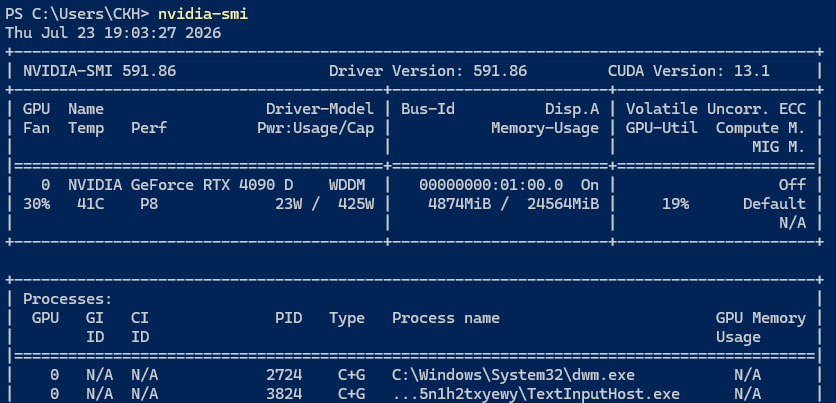 确认显卡驱动与CUDA版本
离线安装NVIDIA Container Toolkit
下载安装包
https://github.com/NVIDIA/libnvidia-container/tree/gh-pages/stable/deb/amd64 搜索你需要的版本,本文使用1.19.1
| 包名 | 版本 | 架构 | 说明 |
|---|---|---|---|
| libnvidia-container1_1.19.1-1_amd64.deb | 1.19.1-1 | amd64 | 基础库包,提供了最基本的功能,其他包都依赖于它 |
| libnvidia-container-tools_1.19.1-1_amd64.deb | 1.19.1-1 | amd64 | 基础工具包,依赖于 libnvidia-container1 |
| nvidia-container-toolkit-base_1.19.1-1_amd64.deb | 1.19.1-1 | amd64 | 基础组件包,依赖于前面的包 |
| nvidia-container-toolkit_1.19.1-1_amd64.deb | 1.19.1-1 | amd64 | 主要的工具包,依赖于以上所有包 |
| libnvidia-container1-dbg_1.19.1-1_amd64.deb | 1.19.1-1 | amd64 | 调试符号包,只在调试问题时使用 |
| libnvidia-container-dev_1.19.1-1_amd64.deb | 1.19.1-1 | amd64 | 开发包,只在进行开发时使用 |
文件拖入WSL
将下载好的文件复制到Linux/Ubuntu-26.04/home/你创建的用户名/
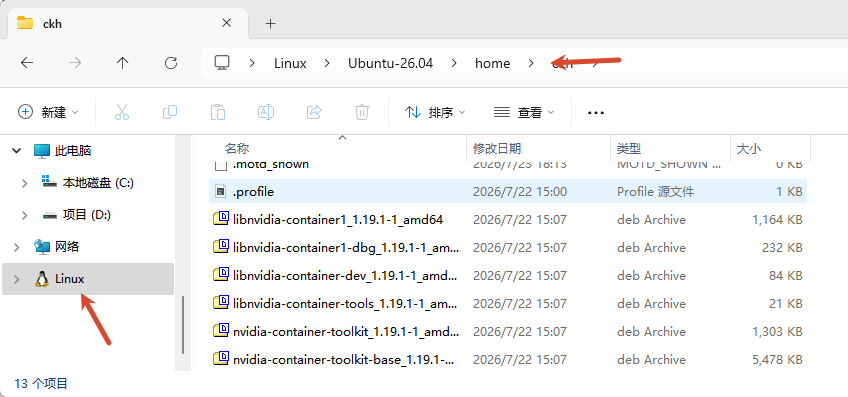
安装必要包
请严格按照一下顺序安装
sudo dpkg -i libnvidia-container1_1.19.1-1_amd64.deb
sudo dpkg -i libnvidia-container-tools_1.19.1-1_amd64.deb
sudo dpkg -i nvidia-container-toolkit-base_1.19.1-1_amd64.deb
sudo dpkg -i nvidia-container-toolkit_1.19.1-1_amd64.deb
检查安装情况
nvidia-ctk --version
sudo nvidia-ctk runtime configure --runtime=docker
出现以下提示即表示安装成功
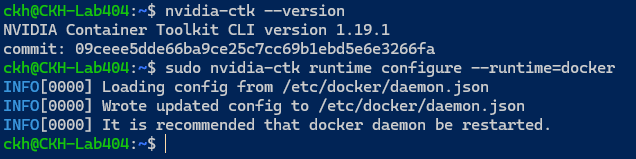
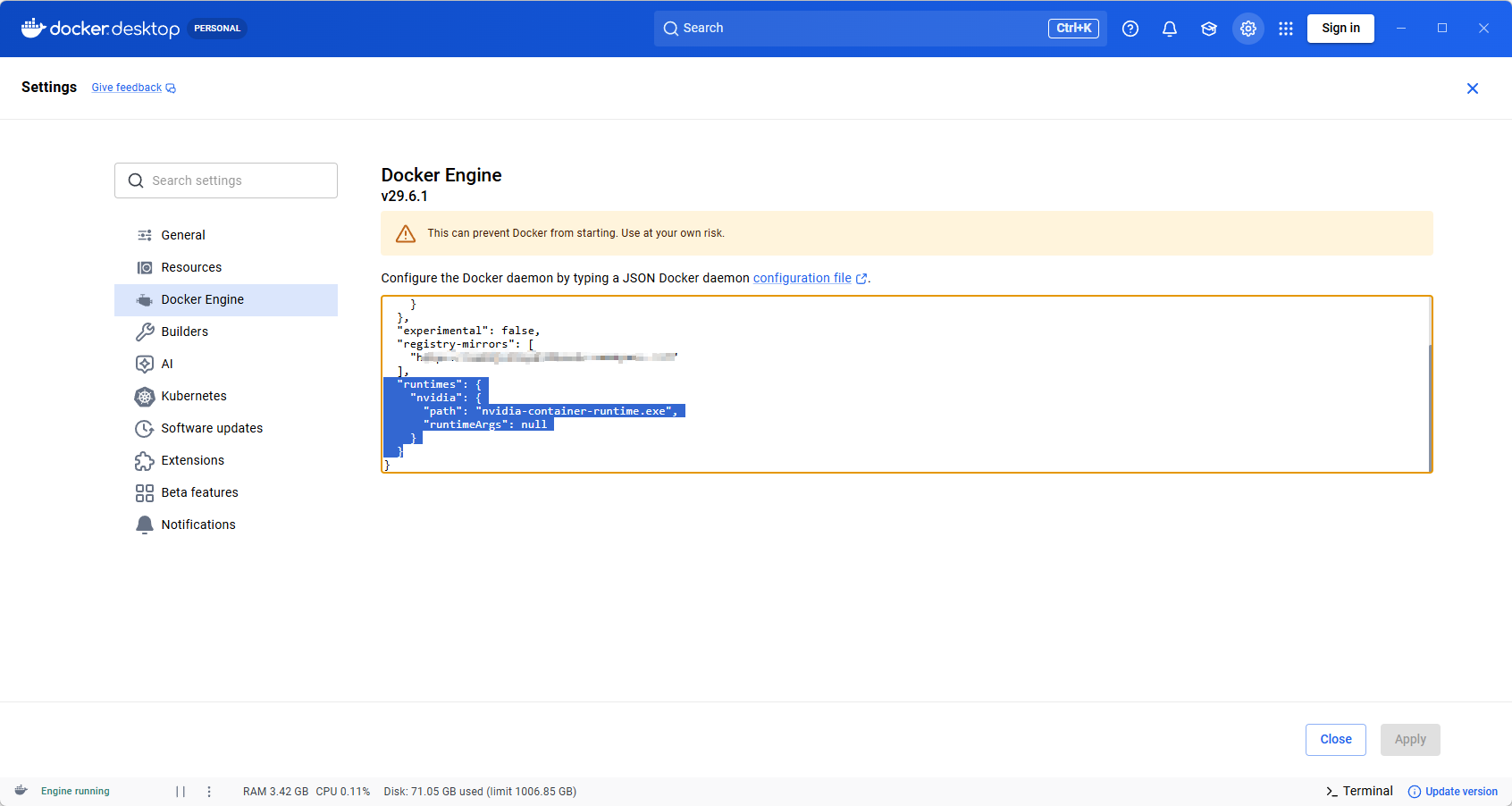
修改Docker引擎
在Docker Desktop的Docker Engine中增加以下配置
  "runtimes": {
    "nvidia": {
      "path": "nvidia-container-runtime.exe",
      "runtimeArgs": null
    }
  }
测试与创建配置
执行docker run命令创建容器时,增加--gpus all参数,此为NVIDIA Container Toolkit 核心参数,将宿主机所有 GPU 透传给容器
测试可参考文章《对GPU算力服务器裸机的容器共享化架构设想与实践》的科研适用镜像与文章《GPU算力服务器裸机的容器共享化架构的用户视角》的Jupyter服务器配置
装机快速测试命令
创建科研镜像容器
docker run -it --rm --gpus all --name pytorch-26.06 -p 8888:8888 cmk5jct5sp432brntc-nvcr.xuanyuan.run/nvidia/pytorch:26.06-py3
docker exec -it pytorch-26.06 jupyter lab
环境测试
Python代码
import torch

print(f"PyTorch Version: {torch.__version__}")
print(f"CUDA Available: {torch.cuda.is_available()}")

if torch.cuda.is_available():
    print(f"CUDA Version: {torch.version.cuda}")
    print(f"GPU Device: {torch.cuda.get_device_name(0)}")

    # 核心测试:矩阵乘法
    device = torch.device("cuda:0")
    a = torch.randn(1024, 1024, device=device)
    b = torch.randn(1024, 1024, device=device)
    c = torch.matmul(a, b)

    print(f"Matrix Multiplication Result Shape: {c.shape}")
    print("✅ PyTorch and CUDA are working perfectly!")
else:
    print("❌ CUDA is not available. Please check your NVIDIA Container Toolkit setup.")
Powershell直接执行
docker exec pytorch-26.06 python -c "
import torch;
print('PyTorch:', torch.__version__);
print('CUDA Available:', torch.cuda.is_available());
print('GPU:', torch.cuda.get_device_name(0) if torch.cuda.is_available() else 'None');
a = torch.randn(1024,1024, device='cuda');
b = torch.randn(1024,1024, device='cuda');
print('MatMul Shape:', torch.matmul(a,b).shape);
print('✅ Test Passed!')
"
压力测试(用于检查显卡穿透是否满血)
Python代码
import torch
import time

def stress_test(gpu_id=0, matrix_size=8192):
    device = torch.device(f"cuda:{gpu_id}")
    print(f"Starting GPU Stress Test on {torch.cuda.get_device_name(gpu_id)}...")
    print(f"Matrix Size: {matrix_size}x{matrix_size}")

    # 在显存中分配两个大矩阵
    a = torch.randn(matrix_size, matrix_size, device=device)
    b = torch.randn(matrix_size, matrix_size, device=device)

    try:
        while True:
            # 持续进行矩阵乘法,消耗算力
            torch.matmul(a, b)
            # 强制同步,确保当前批次算完再算下一批(避免异步排队导致的假低占用)
            torch.cuda.synchronize()

    except KeyboardInterrupt:
        print("\nStress test stopped by user.")

if __name__ == "__main__":
    # 默认占用第 0 号 GPU,矩阵大小设为 8192
    stress_test(gpu_id=0, matrix_size=8192)
Powershell直接执行
docker exec -d pytorch-26.06 python -c "
import torch
device = 'cuda:0'
a = torch.randn(8192, 8192, device=device)
b = torch.randn(8192, 8192, device=device)
print('Stress test started...')
while True:
    torch.matmul(a, b)
    torch.cuda.synchronize()
"
RustDesk配置:==Qfi0TVTFlZtllcYJHZxlHc0cHZrkHT20WerJEbnpFUClUU1djaTlkRwUlUwd0ciojI5V2aiwiIiojIpBXYiwiI3ETMxIjOlRXaz5ibj1CarNmI6ISehxWZyJCLiYTMxEjM6UGdpNnLuNWLot2YiojI0N3boJye
账号:Lab404
密码:Jinrong@404